Thursday, June 13, 2013

Martell TV Beta Launches


I'm happy to announce that my company's web application, Martell TV, is now in live beta test mode.

For those who don't know, since starting this blog I became the CEO of a Youtube Partner Network / Multi Channel Network (MCN) called Martell Brothers Studios. While doing all the SEO work for our properties (and writing lengthy articles about video SEO) I started to think, "Hey maybe there is a better way to build audiences using Youtube than through search engines".

Martell TV is the ultimate outcome of that; my conclusion was the best way to use Youtube would be if it worked more like traditional broadcast, allowing people to create their own Station lineups and publish daily schedules of videos.

It's still very beta -- it is missing about 80% of the features I originally wanted it to have -- but it is a functional and solid application that does the essentials.

I hope you'll find it useful.


Sunday, January 6, 2013

How to Outsmart Wiki Editors while SEOing

When it comes to SEO, there is a dark side to Wikipedia. Many of the supposed "do-good" editors on wiki sites are removing your links not because they honestly care if you're a reliable source or not, but because they are employed by SEO companies who are trying to protect their link juice (this is also why you may have trouble removing links from a wikia which obviously are spam. Some of the admins are the spammers!). They also do things like "wiki jacking" which ultimately benefit them while crushing competitors.

You might think it's despicable, but here's the thing: because this stuff goes on it becomes necessary for you to also engage in it. It's hard to compete with these sites who are receiving so much authority from wikis if you're not also being viewed as an authority site by wikis (so if you're gonna blame someone, blame the search engine companies for giving so much authority ranking to wikis, who are way too easy to manipulate).
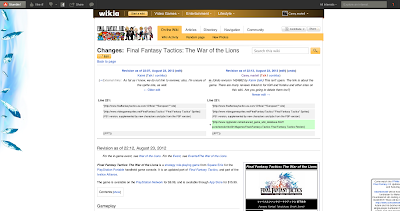
The key to beating the rival editors;
wiki history pages!

It's pointless to engage in edit wars with them, because they control these websites and even if you manage to convince one person to not delete your link there will be others who will. So trying to protect your links on wiki sites is a gigantic waste of time.

Method #1 Link to older page versions

However, I have figured out a way to beat these guys. You see, Wiki sites allow anyone to view the prior versions of these pages and then directly link to them. All you need to do is go to the history page for that article and then find one of the edits before your site was removed from the page. Next socially bookmark that version of the page and even embed the link it into your articles and blog comments!

The even cooler thing about this technique is that your deleted link is now at the very top of the page in the part that shows what content was changed. This works well with services like Stumbleupon or Reddit, especially if there was any controversial statements made by the editors. Edit wars can spark the interest of Stumbleupon users, which can convince people to copy and paste your link into their browser just to see what the fuss was all about.

Unfortunately the older versions don't have quite as much authority as the normal pages do, but the domain names still carry a great deal of authority weight to them. As long as you help search engines find the pages by submitting the link all over, you can get authority ranking back to your site from these older page versions.

Lastly you can always add a bunch of links to your content on your profile page, and then submit that profile page all over the internet. And every time you post a signature on Wikipedia's talk pages, you'll be internally linking back to your profile page, too!
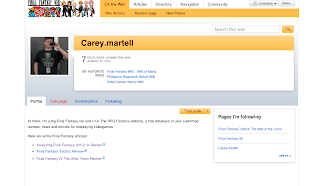
Haters gonna hate, but they can't stop this!

Method #2 Make a community blog post

The most latest Wikia version software allows any registered user to make a community blog. Moderators and rival SEO competitors pay very little attention to these blogs because they are so focused on controlling the articles. This means you can post your links on your blogs with a much lowered chance of having the links deleted.

Community blogs are a boon for back-links!


You may not be able to win the edit battles to ensure your links remain on the most recent version of  heavily trafficked articles (which the majority of users will see), but you can win the war to get authority ranking going back to your website from wiki domains related to your keywords!

Don't let rival editors stop you, just outsmart them!


Monday, October 15, 2012

How to add closed captions to increase Youtube video views


The single greatest tip I could give anyone on how to improve their rank in Youtube Search is to add a close captions script to their videos. This is because Youtube Search cannot detect what is in your audio files anymore; they used to generate a "machine" script using voice recognition technology, but now Youtube uses this technology to match a pre-written script to timecodes in your video.

What this means is that if you write a text file with everything you say in your video, Youtube will be able to pull that data to generate a closed caption script for you. This is such an easy thing to do that there is no reason to not do it. And better yet every word and phrase in your script is going to be considered a keyword, helping your video gain more visibility in Youtube Search results.


How to choose the best tags for Youtube videos


In this video tutorial I show you an easy way to find the best tags to place in your videos. You can also use the Youtube Keyword Tool and the AdWords Keyword Tools but the information isn't always up to date. Using the suggest box you'll get the latest trending keywords for whatever topic you are titling your video, and be able to rank higher in the results.

Realize, however, that this isn't a secret tactic. Pretty much everyone does this already, so I wouldn't expect to get too much crazy traffic by doing this. However properly tagging your videos is a simple step that won't take too much of your time to complete, and will bring you at least a few hundred more views than you would get if you didn't tag your videos at all.


Tuesday, September 18, 2012

Fair Use and Cover Songs on Youtube

As Youtube gets bigger, Google has been working out deals with major companies to make more money. Some of these deals involve how Google interprets "Fair Use" on Youtube.

The most important thing people need to understand about Youtube is that it is a privately held corporation and they are free to decide what content they will and won't monetize!

By contrast, "fair use" is a legal doctrine intended as a defense against a lawsuit.

If no one is suing you, "fair use" is simply not applicable!

And despite what you may have heard, inserting something like, "This video is a review and is protected by the fair-use policy and was made for educational purposes" provides you absolutely zero protection from your video being disabled! 

The reason is thus: because it is not cost effective to sue millions of people who upload copyrighted material, major corporations are working out agreements with Youtube to ensure they don't have to file lawsuits to have copyright infringement removed from Youtube. This means it becomes very important to comply with Youtube's policies concerning the use of material you don't own in your videos, which is described at http://www.youtube.com/t/copyright_permissions

If you are interested in making a cover song or song parody it would behoove you to obtain a license for the song to show Youtube when a Content ID claim is undoubtedly placed on your video, or your monetization request is declined by a member of Youtube's copyright team.

Obtaining a license is not always as expensive as you may think, because the entertainment industry is very complex. Although one corporation may own the rights to a song, many companies have licensing agreements to large libraries of songs and they are able to sell "sub-licenses" to others.

For example, https://www.songclearance.com/

This company tends to charge $15 to issue a license for making a cover song (which includes parody). You will also need to pay royalties of your song earnings, but this is better than the $0 you would be making without a license.


Thursday, September 13, 2012

How to monetize royalty free music on Youtube videos


This official Youtube video demonstrates how to monetize a video that has royalty free music included in it and for which you have a license to use the music.

Bear in mind, Youtube's full policy for monetization can be found here. You must still comply with all Youtube's policies for monetization.


How to monetize Youtube gameplay videos


As a Youtube Partner who creates video game reviews on my channel The RPG Fanatic, I frequently get asked about whether making video game reviews are allowed to be monetized or not.

The above video explains Youtube's policy concerning video game footage and fair use. This is important information to know because unless you have permission from a developer to use gameplay footage in your videos, you must abide by Youtube's fair use policy for videogame footage.

Youtube's policy is very strict. They will not allow you to place ads on gameplay if there is no audio commentary tracks you have created yourself, and your commentary must provide educational or instructional value. This means you can't just upload video game trailers and expect to make money; Youtube won't allow you to do that.

Youtube also has an official video that demonstrates how to file a claim for videogame footage if you are invoking fair use,


For more information about fair use and DMCA on Youtube, please check the following links:

Using some copyrighted content in your video:
http://www.google.com/support/youtube/bin/answer.py?answer=143457

Youtube Video Monetization checklist:
http://support.google.com/youtube/bin/answer.py?hl=en&answer=2490020

Partner Help Center: Video Game and Software Content
http://www.google.com/support/youtube/bin/answer.py?hl=en&answer=138161

Center for Social Media: Fair Use for Documentary & Online Video Makers
http://www.centerforsocialmedia.org/fair-use

Sunday, September 9, 2012

How to setup a Youtube Show page


A Youtube Show is more than just a playlist; it is a powerful tool for promoting your videos. Youtube Shows receive top billing in Youtube Search results. If you make a show title that is exactly the same as a keyword, you will always have your videos shown at the top of the search page for that keyword.

For example, I made a show called "Online Games" for my MMORPG related videos. Online Games receives several hundred thousand searches on Youtube per month. My videos now rank at the top of Youtube search results simply because they are connected to my show that has those keywords!

Youtube Shows are more than just a playlist!

Shows also appear on their own special search page, http://www.youtube.com/shows. They can also have the episodes made available for rental through Youtube.

Unfortunately a Youtube Show is an exclusive option for select Partners. Youtube does not give it to every channel. However networks tend to allow all channels associated with them to have a Show, so this tutorial can be useful to helping networked Partners learn how to use a Show page.

When naming a show, you should use the Youtube Keyword Suggestion tool to decide on the name. Try to pick something that is receiving lots of searches but doesn't already have a Show created for it. Youtube Search rarely displays more than one Show on the search page, unless that keyword is getting millions of searches every month. 

It's important to fill out everything correctly to have a show approved!
It is important that you fill out the Show page completely. As soon as you make it, the show enters an approval query for Youtube Partner support. You cannot just instantly be approved for a Show; it must be inspected first.

Several things can get your show rejected;


  • Making a show that has the same name as an existing Show


  • Adding videos which have "extra tags" in their description. All tag blocks should be in the "Tags field" of the video. If you want to use keywords in your description, put them in the form of a sentence.
  • Not submitting high quality images for your Show.
  • Not including any videos as episodes for your Show.
  • Having video titles that are much too long or repeat words too much (for example, if your show is called "Bob's Game Reviews" then don't put "game review" in the title of your videos. Your show title will automatically be part of the title of all episodes attached to the Show page). 
If a show is rejected, the Youtube employee will have notes saying what needs to be done for the show to be approved. Unfortunately you won't get an email if your show is approved or rejected, so you will need to check back on your Show tab to see if it was approved. It may take up to a week for someone to review your submission.